Productformulier

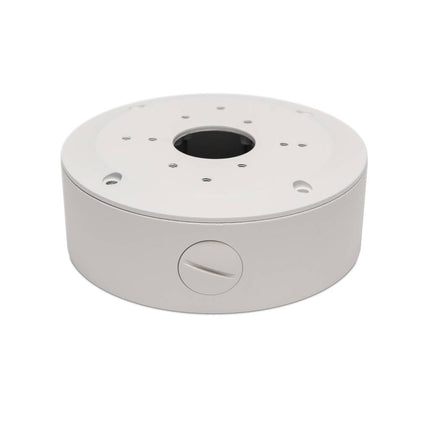
Kabeldoos Pro Dome/Bullet Beveiligingscamera met 4x Zoom

Met de vandaalbestendige metalen kabeldoos voor bullet beveiligingscamera's kun je zowel de basic, premium als pro bullet camera's veilig monteren. Lees meer

€30,00€24,79 Incl. BTWExcl. BTW

Op werkdagen: Voor 16:00 besteld = Morgen in huis
    • iDEAL
    • Visa
    • Maestro
    • PayPal
    • Apple Pay
    • Google Pay
    • Veilig achteraf betalen met Klarna

      klarna

    Offerte op maat nodig?

    • Probleemloos retourneren binnen 14 dagen
    • 2 jaar garantie
    • Gratis verzending binnen Nederland en België

    Met de vandaalbestendige metalen kabeldoos voor bullet beveiligingscamera's kun je zowel de basic, premium als pro bullet camera's veilig monteren.

    Size chart

    Met de vandaalbestendige metalen kabeldoos monteer je veilig de kabels van jouw camera's.


    Passend voor: 

    - Basic bullet
    - Premium bullet
    - Pro bullet 4x zoom 

    - Basic dome 
    - pro dome 4x zoom

    Eerder door jou bekeken

      Eenvoudiger aansluiten dan ooit dankzij Power over Ethernet.

      Ontdek het gemak van Power over Ethernet (PoE), een innovatieve technologie die het mogelijk maakt om elke camera met slechts één kabel aan te sluiten.

      Over deze kabel verstuurt de camera zijn beelden naar de recorder, terwijl de recorder de camera van stroom voorziet. Een stroompunt bij de camera is niet nodig.

      An inconspicuous dome camera.

      For those looking for discreet camera surveillance, dome cameras are the best choice. These cameras have a distinctive round shape, allowing them to blend seamlessly into their surroundings. Furthermore, the viewing direction is difficult to discern. Dome cameras can be mounted flat against the wall or on the ceiling.

      For indoor and outdoor use.

      Bascom cameras are waterproof (IP67 rating) and can withstand all weather conditions. This makes them ideal for both indoor and outdoor use. Furthermore, the robust housing is made of hardened aluminum and finished with a high-quality powder coating. This protects the cameras against corrosion and wear, making them a durable choice with an exceptionally long lifespan.

      Full HD picture quality.

      With Bascom cameras, blurry images are a thing of the past. They boast Full HD resolution, with over two million pixels capturing every detail with precision. In these exceptionally sharp images, people are clearly recognizable, and you see exactly what's happening.

      Watch demo video

      You can see everything, even at night.

      As soon as it gets dark, Bascom cameras automatically switch to their night vision mode, which utilizes advanced infrared technology. This allows them to maintain clear vision even in complete darkness—where the human eye can't see anything—at distances of up to 20 meters.

      With built-in microphone.

      The cameras in this system are equipped with a built-in microphone. This captures all ambient sounds and records them along with the images. The microphone can be easily switched on and off for each camera.

      An independent recorder.

      Experience maximum reliability with the powerful recorder, the central recording point for all surveillance cameras. Thanks to the recorder, the core function of the camera system—capturing camera footage—is independent of an internet connection. This guarantees that all camera footage is always recorded uninterrupted and in the highest quality.

      Recording for weeks.

      Designed for 24/7 recording, the recorder boasts extra-large storage capacity, allowing you to store several weeks' worth of footage. So you don't have to worry about running out of space. And when the storage limit is reached, the recorder automatically starts overwriting the oldest footage. So the system never stops.

      Watch along on your smartphone.

      With the Bascom smartphone app, you can access your camera footage from anywhere in the world. The app is easy to use: simply scan the QR code on the recorder and you're instantly connected. You can then view live footage, review recordings, and create backups. The app supports multiple camera systems, allowing you to manage them all from a single view.

      Get notified when motion is detected.

      If desired, you can receive a notification on your smartphone when motion is detected. You have complete control over motion detection and can fine-tune it to your surroundings. This allows you to choose which parts of the image should detect motion. You can also adjust the detection sensitivity to improve precision. This way, you only receive notifications that are important.

      Watch along on your computer.

      Bascom's computer software allows you to easily manage your camera system from your workstation, whether it's located at the camera system's location or elsewhere. The software allows you to view live images, access recordings, and create backups. It supports multiple camera systems, allowing you to manage them all from a single location.

      Watch along on a screen.

      If you want to manage the camera system locally, connect a monitor to the recorder and control the system with the included mouse. Using a monitor is also recommended if you prefer not to connect the system to the internet, which is required for access via a smartphone or computer. In this case, backups should be saved to a USB drive.

      Privacy masking.

      When using security cameras, sensitive privacy details can be unintentionally captured, such as a neighbor's property or the keys on a payment terminal. Privacy masking offers a solution by allowing you to obscure parts of the camera image with a black area. This allows you to use security cameras while protecting the privacy of others.

      Designed for self-connection.

      95% of our customers have never connected a camera system before, but they simply install it themselves. You simply screw the cameras to the wall or ceiling, plug them in, and the system is up and running.

      Read more about the installation

      Step 1. Mount the cameras.
      Screw the cameras to the wall or ceiling, then you can aim them at your leisure. The lens can be rotated in any direction. So even if you hang the camera at an angle or upside down, you'll always get a neat and straight image. The cable can be run out the side or directly behind the cameras through the wall. This way, nothing will be visible.

      Step 2. Plug the cameras into a power outlet.
      Once the cameras are installed, plug them into a power outlet. While they are powered, they will automatically transmit their images over your electrical wiring to the recorder.

      Step 3. Connect the recorder to a power outlet.
      Also connect your recorder to a power outlet. It will automatically receive the camera footage and start recording immediately. The system works immediately, and no further configuration is required. If necessary, you can now connect a monitor or TV to the recorder and control it with a mouse.

      Step 4. Connect the recorder to the internet (optional).
      Want to watch remotely via your computer or smartphone? Connect the recorder to your internet. This can be done directly via a network cable to your modem or router (included as standard), or via Wi-Fi with our  Wi-Fi antenna . Once the system is connected to the internet, simply download the Bascom app. Use the app to scan the QR code on the recorder and you'll have a picture.

      When you buy something from Bascom, we'll help you every step of the way.

      Our expert and easily accessible team is available every business day. With our extensive product knowledge, we're happy to help you choose the right camera system. Even after purchase, we offer free remote support for installation and setup. This allows you to install your system independently and with confidence.

      Read reviews from other customers

      Login

      Wachtwoord vergeten?

      Heb je nog geen account?
      Maak gratis een account aan en geniet van vele voordelen.